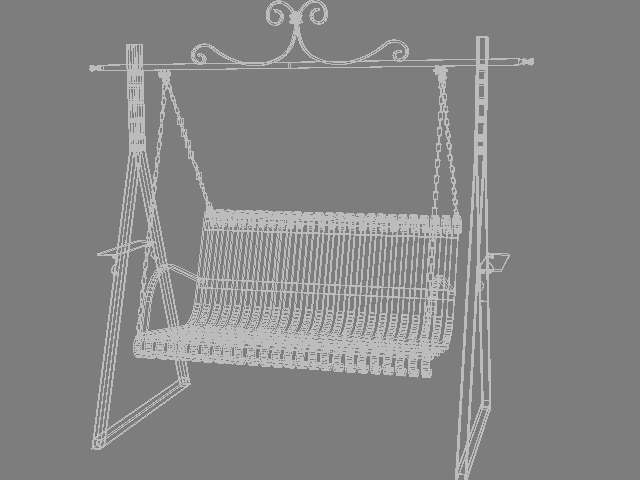
Description
This Swing Chair spreadsheet from 3D-LABS gives instant, checkable results for practising engineers — no manual derivation required.
What’s Included in This Spreadsheet
[contact-form-7 id="df6d8a2" title="3D-Model"]
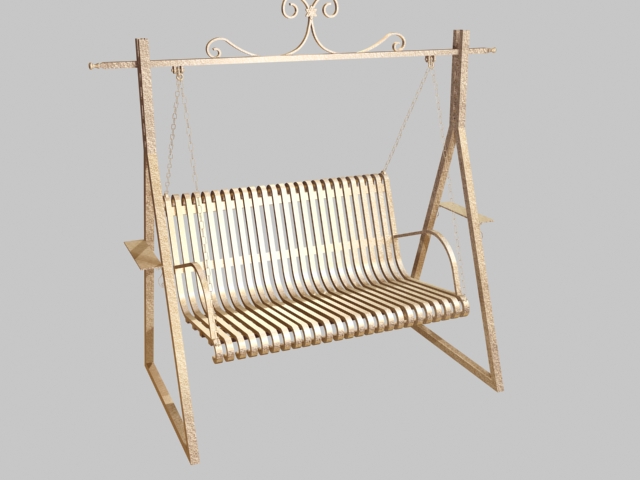
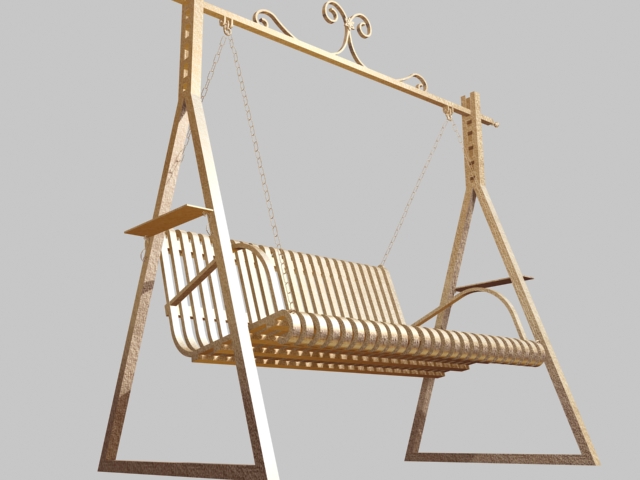
Introducing our Swing Chair 3D Model: a relaxing and stylish representation designed for outdoor and indoor leisure spaces. Available in .3ds, .max, and .obj formats, this model seamlessly integrates into interior design visualizations, architectural projects, and outdoor scene simulations. Ideal for creating serene garden settings, cozy patio areas, or modern relaxation spaces, the Swing Chair 3D Model combines comfort with aesthetic appeal. Whether you’re designing residential gardens, hospitality venues, or virtual outdoor retreats, elevate your projects with the quality and tranquility of our Swing Chair 3D Model.
What’s Included
An instant Excel download with the complete formula set, a worked numerical example, and reference to the governing standard — ready to adapt to your own project inputs.
Related Products
- Aerospace Engineering — Practical Foundations
- Aircraft Conceptual Design for the New Aviation
- AutoCAD for Engineering Drawings — IS 696 / SP 46
Introducing the Swing Chair 3D Model
The Swing Chair 3D Model from 3D-LABS is a perfect addition to your design toolkit, offering a stylish and relaxing representation ideal for both indoor and outdoor spaces. Available in multiple formats including .3ds, .max, and .obj, this model is designed for easy integration into your architectural visualizations and scene simulations.
Applications
Whether you’re working on residential garden designs, hospitality venue layouts, or virtual outdoor retreats, our Swing Chair 3D Model enhances the aesthetic appeal and comfort of your projects. It is particularly suited for creating serene garden settings and cozy patio areas, making it a versatile choice for various design applications.
What’s Included
Along with the 3D model, you will receive an instant Excel download featuring a complete formula set, a worked numerical example, and references to relevant governing standards. This comprehensive package ensures you have all the tools needed to adapt the model to your specific project requirements.
About swing chair
swing chair is a 3D model from the 3D-LABS Furniture collection, built for interior designers, animators, and architectural visualisers. Applications include interior renders, walkthrough animations, product configuration, and VR/AR staging. The model is delivered in industry-standard formats compatible with all major 3D applications.
Formats and technical specifications
The download includes:
- Native format — Blender (.blend) or 3ds Max (.max) with all materials and lighting pre-configured.
- Universal formats — STL, OBJ, FBX for cross-application use in Unity, Unreal Engine, Maya, Cinema 4D, and other major 3D applications.
- Engineering formats — STEP and IGES where applicable for use in SolidWorks, Inventor, or other CAD applications.
- PBR textures — base colour (albedo), normal, roughness, metallic, and ambient occlusion at 2K or 4K resolution.
- Preview images — high-resolution renders and turntable animation for visual reference.
Software compatibility
swing chair works in all major 3D applications: Blender 3.0+, 3ds Max 2020+, Maya 2020+, Cinema 4D R23+, Unity 2020 LTS+, Unreal Engine 4.27+ and 5.x, SolidWorks 2020+, and Autodesk Inventor 2020+. If your workflow needs a specific format we have not included, contact us and we will provide it.
License terms
Purchase includes a commercial single-project or single-user licence — you can use swing chair in commercial projects (games, animations, renders, marketing, product design) without additional royalties. Redistribution or resale of the model itself is not permitted. Extended licences for franchise use, mass distribution (over 100,000 units), or template resale are available on request.
Pricing and delivery
swing chair is priced at ₹700. Delivery is instant — download link is emailed after payment and available in your account. One-time purchase, no subscription.
Related models and services
- Browse other 3D models in the Furniture category (31 items).
- Need a custom 3D model? See our 3D Modeling & Animation Services.
- Building an architectural walkthrough? Our Architectural Walkthrough Service uses similar models.
- Complement with our 18 CAD reference drawings for engineering applications.
Frequently asked questions
What formats does swing chair come in?
The download package includes native format (typically Blender or 3ds Max), plus universal formats: STL, OBJ, FBX, and STEP where applicable. Neutral formats work in Unity, Unreal Engine, Maya, Cinema 4D, SolidWorks, and other major 3D applications.
What is the polygon count?
Polygon count and level of detail (LOD) are optimised for the intended use case. Game-ready models are typically 5,000-25,000 polygons. Cinematic-quality models are 50,000-500,000 polygons. Both LOD variants are included in the download where relevant.
Are textures and materials included?
Yes. PBR (physically-based rendering) textures are included: base colour (albedo), normal map, roughness, metallic, and ambient occlusion, at 2K or 4K resolution depending on the model. Materials are pre-configured for the native application.
What are the license terms?
Purchase includes single-project or single-user commercial license — you can use swing chair in commercial projects (games, animations, renders, marketing) without additional royalties. Redistribution or resale of the model itself is not permitted. Extended licenses available on request.
Can I request modifications to the model?
Yes. 3D-LABS offers paid customisation (from USD 150) — additional textures, geometry modifications, rigging for animation, or LOD variants. Email info@3d-labs.com with your requirement for a quote.
About 3D-LABS 3D models
swing chair is one of 117 3D models in the 3D-LABS collection, spanning furniture, mechanical equipment, electronics, lighting, vehicles, architecture, and more. Every model is built by 3D-LABS designers, textured with PBR materials, and delivered in industry-standard formats — ready to drop into your production pipeline.
Browse the full 3D model collection, or explore our engineering and design services for custom work.