Description
B31.3 Chapter IX to VIII Div 3 Fatigue Bridge — Excel — method, governing standards and output schedule
B31.3 Chapter IX refers fatigue evaluation out to ASME VIII Division 3 — but it hands over a number that Division 3 cannot use as it stands. SE from B31.3 is a nominal displacement stress range on a Tresca-like basis; KD-312 needs a local total von Mises amplitude that includes the pressure cycle. Four separate differences sit between the two quantities, and this workbook takes them one at a time, with the numbers shown at each step. It then does the thing that matters commercially: it computes the allowable cycles by the correct route and by the SE shortcut, and reports how non-conservative the shortcut is for your stress state.
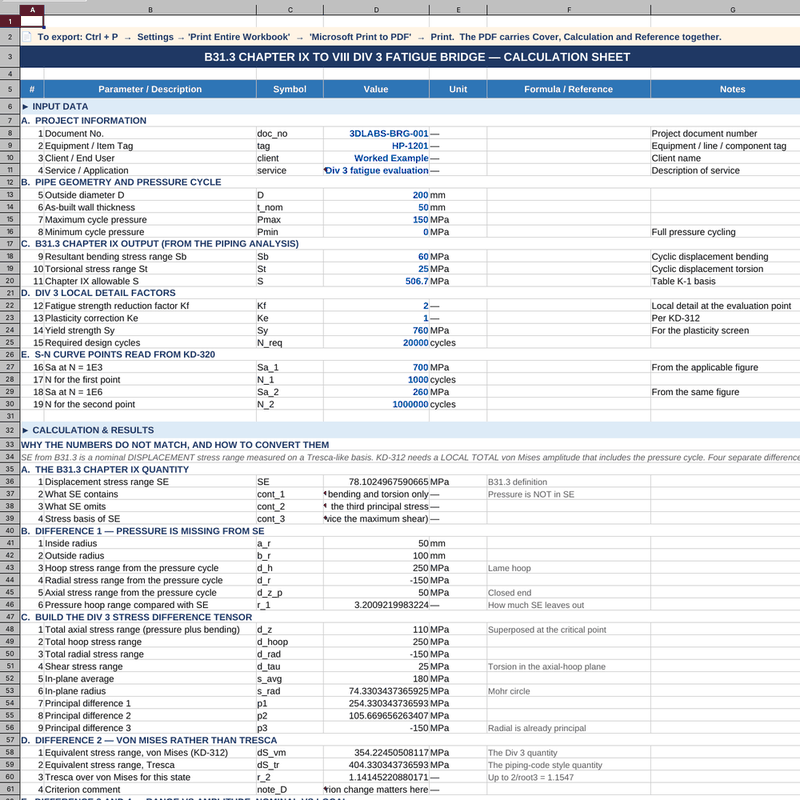
This 3D-LABS workbook bridges ASME B31.3 K302.3.5 to ASME VIII Division 3 KD-312. You supply 15 engineering inputs and the sheet reports 13 results, with every formula left visible so each figure can be traced to the clause it comes from.
Method of calculation
SE is first reconstructed from the piping output on the B31.3 definition, and what it contains and omits is stated explicitly. Difference 1 is the missing pressure cycle: the Lamé hoop, radial and axial stress ranges are computed and the omitted hoop range is reported as a ratio of SE. Difference 2 is the criterion: the full stress difference tensor is assembled, reduced to principal differences through a Mohr circle, and evaluated both as von Mises and as Tresca, with the ratio bounded by 2/√3 = 1.1547. Differences 3 and 4 are range versus amplitude and nominal versus local: the range is halved and Kf, Ke are applied to reach the effective amplitude KD-320 expects. The overall SE-to-Division-3 factor is reported, and the allowable cycles are evaluated on both routes so the shortcut can be judged rather than trusted.
Governing standards and references
- ASME B31.3 K302.3.5 — Chapter IX stress limits and the referral to VIII Div 3 for fatigue (2022)
- ASME B31.3 302.3.5 — displacement stress range SE definition, √(Sb² + 4St²) (2022)
- ASME VIII Div 3 KD-231 — equivalent stress, von Mises definition (2023)
- ASME VIII Div 3 KD-312 — equivalent stress range and alternating amplitude (2023)
- ASME VIII Div 3 KD-320 — design fatigue curves (2023)
Each formula cites the clause it comes from on the same row as the result it produces, so a reviewer can check the sheet line by line against the standard.
Acceptance criteria
The conversion is reported as sound when the effective alternating amplitude derived through all four differences gives allowable cycles in excess of the required design cycles. Where the SE shortcut returns a longer life than the correct route, the sheet flags the shortcut as non-conservative and quantifies by how much.
Who uses this calculation
Pipe stress engineers handing a Chapter IX line over to a Division 3 fatigue evaluation; pressure vessel engineers receiving piping output and needing to know what it does and does not contain; and reviewers who have to defend the conversion in a design audit.
Important note on scope
This is a 3D-LABS worked example built in the ASME clause sequence. It is not a reproduction of an official ASME example — ASME publishes PTB-3 for Division 2 only, and there is no Division 3 example manual. Formulas, factors and acceptance limits must be verified against the governing edition of the Code before design use. S-N and crack-growth data are entered by the user from the Code figures and tables.
What you receive
- Excel calculation file (.xlsx) — fully unlocked formulas, no macros, no add-ins
- Cover sheet — document number, revision, code basis, units and a colour legend (blue = input, black = calculated, yellow = key result)
- Calculation sheet — every intermediate quantity reported on its own row with the symbol, unit and clause reference beside it
- Reference sheet — the governing clauses, editions and what each one is used for
- Worked example — realistic values pre-loaded so you can verify the sheet against a known case
- Email support — write to info@3d-labs.com with questions about inputs, methodology or results
Delivery and licence
Instant download after payment at ₹12,999. One payment, lifetime access, no subscription. The workbook is a design aid — results must be verified by a qualified engineer against the governing Code edition before use.
What B31.3 Chapter IX to VIII Div 3 Fatigue Bridge — Excel calculates
B31.3 Chapter IX to VIII Div 3 Fatigue Bridge — Excel is an Excel-native engineering calculation tool built by 3D-LABS for mechanical, design, and equipment engineers working with pressure equipment, rotating machinery, and mechanical systems. It is used for sizing pressure vessels, heat exchangers, flanges, bolts, and other mechanical components. Every input is labelled and every output is traceable — the sheet is designed to be checkable, not a black box.
Codes and standards followed
B31.3 Chapter IX to VIII Div 3 Fatigue Bridge — Excel follows industry-standard Mechanical Engineering codes including ASME VIII Div 1 & 2, ASME B16.5, TEMA, API 660, HEI, EN 13445. Each formula is cross-referenced to the applicable code clause so your reviewer can trace calculations back to the standard.
If your project requires a different code base (e.g. converting an IS-code sheet to an ASME basis), we can produce a code-variant edition on request. Contact info@3d-labs.com for a variant quote.
What is included in your download
- The Excel calculation file (.xlsx) — fully unlocked formulas, cell-level comments, and a clear input/output layout.
- A sample worked example — realistic inputs plus expected outputs so you can validate the spreadsheet against a known case.
- User notes (PDF) — assumptions, code clauses referenced, and edge-case guidance.
- Revision history — every update to the spreadsheet is logged so you know what changed and when.
- Email support — reply within 24 hours (Monday to Saturday, IST) for questions about the spreadsheet or its use.
Software requirements
B31.3 Chapter IX to VIII Div 3 Fatigue Bridge — Excel runs in Microsoft Excel 2016 or later on Windows and Mac. It is also compatible with LibreOffice Calc and can be imported into Google Sheets (some formatting may shift). No macros are required and no external add-ins are needed — every calculation runs in cell formulas, which means every step is auditable.
Pricing and delivery
B31.3 Chapter IX to VIII Div 3 Fatigue Bridge — Excel is priced at ₹12,999 (approximate USD equivalent shown in the cart). Delivery is instant — after payment you get a download link immediately and a receipt by email. One-time purchase, lifetime access, no subscriptions or hidden fees.
Payment methods: Cashfree (Indian customers) or PayPal International (customers outside India). Volume discounts are available on bundles of 5 or more spreadsheets from the same discipline — contact sales@3d-labs.com for a bundle quote.
Related tools and services
Engineers who work with B31.3 Chapter IX to VIII Div 3 Fatigue Bridge — Excel often also need:
- Other Mechanical Engineering spreadsheets from our catalogue of 119 tools in this discipline.
- Our Pressure Vessel Design Services — for projects where the calculation is only part of a larger scope and you want the full engineering deliverable produced by 3D-LABS.
- Our online training courses — instructor-led programmes on Mechanical Engineering topics, including software mastery and code walkthroughs.
- Our engineering e-book library — 115+ technical PDF references covering theory, practice, and code interpretation.
Frequently asked questions
What software do I need to run B31.3 Chapter IX to VIII Div 3 Fatigue Bridge — Excel?
The spreadsheet is delivered as a native Excel (.xlsx) file. It runs in Microsoft Excel 2016 or later on Windows and Mac. It also runs in LibreOffice Calc and Google Sheets (with import), though some formatting may shift. No macros are required — all logic runs in cell formulas so you can audit every step.
Which codes and standards does this spreadsheet follow?
B31.3 Chapter IX to VIII Div 3 Fatigue Bridge — Excel follows ASME VIII Div 1 & 2, ASME B16.5, TEMA, API 660, HEI, EN 13445. Every formula is cross-referenced to the code clause it implements, so your reviewer can trace the calculation back to the standard. If your project needs a different code, contact us — many spreadsheets are available in code-variant editions.
Are the formulas locked or editable?
All formulas are unlocked and editable. You can adapt inputs, add your own load combinations, integrate the sheet into your own workflow, and audit the logic. We do not password-protect our worksheets — an engineer should always be able to verify what the tool is doing.
What is included in the download?
The download includes: (1) the Excel calculation file with all formulas, (2) a sample worked example showing typical inputs and expected outputs, (3) a short user notes PDF explaining assumptions and code clauses used, and (4) a revision history so you can see how the sheet has been updated over time.
Do you offer support if I have questions?
Yes. Email support with any 3D-LABS spreadsheet purchase — reply within 24 hours (Mon-Sat, IST). We also offer paid tuning if you need the spreadsheet adapted to a specific project (typically USD 50-200 depending on scope). Contact info@3d-labs.com for details.
About 3D-LABS engineering spreadsheets
B31.3 Chapter IX to VIII Div 3 Fatigue Bridge — Excel is one of 686 engineering calculation spreadsheets in the 3D-LABS catalogue — the largest curated collection of code-compliant Excel calculators for practising engineers anywhere. Each sheet is built and reviewed by 3D-LABS engineers who use them daily on real client projects across pressure vessel design, storage tank design, piping stress analysis, structural engineering, heat exchanger design, and FEA services since 2003.
Browse the full SpreadSheet Calculations catalogue or the Mechanical Engineering calculations sub-category. Volume discounts apply on 5+ spreadsheets from the same discipline.
Why buy from 3D-LABS
Built by a working engineering practice
3D-LABS has designed pressure vessels, storage tanks, piping and structures since 2003 for operators and EPC contractors across Asia, the Middle East, Africa and Australia. Our calculation sheets are produced by that same engineering team, to the codes we work to every day.
- 2003Engineering since
- 12Countries delivered into
- 50+Named client organisations
- 14Design codes worked to
Codes our engineers design to
- ASME
- API 650
- API 620
- AWWA D103
- AS 2304
- AS 1210
- TEMA
- PD 5500
- AISC
- IS 800
- EN 1993-4-1
- IBR
- IBC
- BS
Found something that does not work as you expected? Tell us — a working engineer answers, not a support desk.Design and detailing for Larsen & Toubro, Emerson, PetroFac, Qatar Petroleum, ADCO and Samsung Engineering since 2003.